There is a task in your business that happens the same way every single time. Someone gets a message. They read it, figure out what it's about, forward it to the right person, and send a reply confirming it was received. This happens ten times a day. It has been happening this way for years.
That's the task an AI workflow replaces. Not because your team can't do it — they clearly can. But it doesn't require judgment. It requires a process. And processes should run themselves.
What an AI workflow actually is
A workflow, in the traditional sense, is a series of steps that run in order: something happens, then this happens, then that happens. Software has been doing basic versions of this for decades — think email auto-replies or invoice reminders that go out automatically on a set date.
An AI workflow adds one meaningful thing on top: the ability to understand content that isn't perfectly structured. Instead of relying on exact keywords or checkboxes, it can read a plain-text message, figure out what it's about, extract what matters, and act accordingly. That's the part that makes it genuinely useful for the messy, real-world inputs businesses actually deal with.
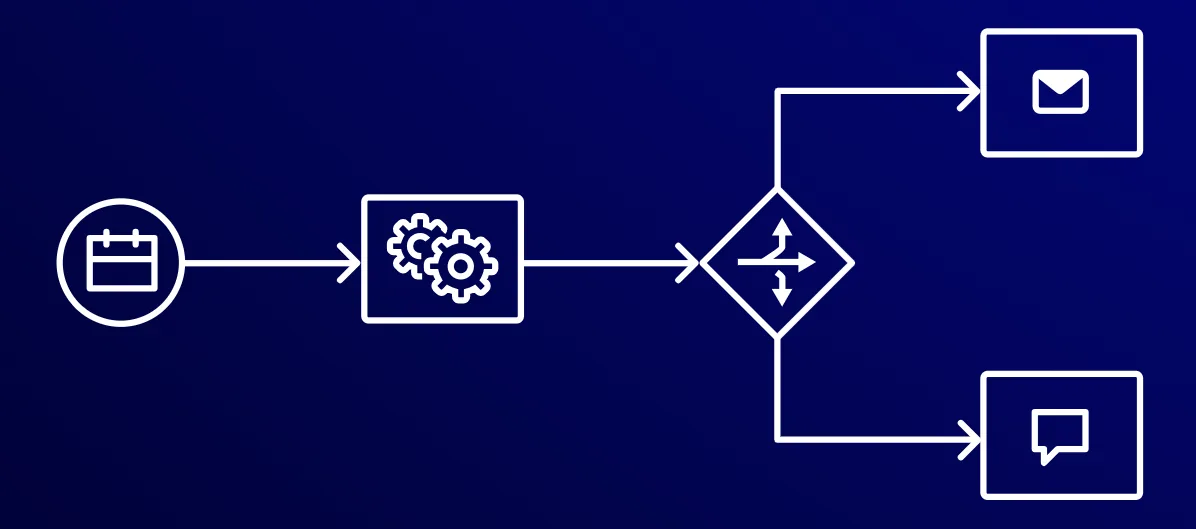
The diagram above is the basic shape of almost every AI workflow: a trigger fires, a process runs, a decision gets made, and different actions follow. What changes between workflows is what's inside each box — and how much intelligence lives in the decision step.
A realistic example
Let's make this concrete. Say you run a small property management company. Tenants send maintenance requests by email, WhatsApp, or phone. Someone on your team reads each one, decides what type of issue it is, assigns it to the right contractor, logs it, and sends a confirmation back to the tenant. Nothing complicated — just time-consuming.
An AI workflow handles it like this:
- The message arrives (from any channel).
- The AI reads it and classifies the issue: plumbing, electrical, structural, or something else.
- It checks contractor availability and assigns the job.
- It sends the tenant a confirmation with an estimated timeframe.
- It logs everything in your system.
Your team member now handles the exceptions — the frustrated tenant, the unclear request, the emergency that genuinely needs human judgment. Everything else runs without them.
For a company managing 30 properties, that's easily 20–40 maintenance requests a month. At 10–15 minutes per request handled manually, you're looking at 4–10 hours of admin work — gone.
What your business actually gets
Three things, specifically.
Time back. Not in some vague "efficiency improvement" sense — in actual hours per week. Repetitive tasks have a measurable cost. When you automate them, that cost disappears and the time goes somewhere more useful.
Consistency. Every request goes through the same process, at any time of day. No one forgets to send the confirmation at 7pm on a Friday. The workflow doesn't get tired, distracted, or sick.
Scale without hiring. When your volume doubles, the workflow handles twice as many requests with the same effort from your team. Hiring another person for that same growth would cost significantly more.
When it makes sense (and when it doesn't)
Three honest criteria for deciding whether a workflow is worth building.
The task happens often enough. One-off tasks don't justify the setup time. If something happens daily or several times a week at consistent volume, the math is usually there.
The inputs are predictable enough. "Predictable" doesn't mean identical — it means the variation is within a range the AI can handle reliably. Customer emails vary. They're still predictable enough. Highly technical legal documents with bespoke language — different story.
Getting it wrong is recoverable. Mis-routing a maintenance request is fixable. Mis-routing a payment instruction is not. Use AI workflows where a mistake gets caught before it becomes a real problem.
A workflow automates the process. Your team handles the exceptions. Get that balance right, and you've built something that genuinely scales.
Where it doesn't make sense: situations that require real judgment, a relationship, or context that isn't in the message. AI workflows are excellent at doing what they're told. They're not good at figuring out what they should be doing in a situation no one anticipated. That's still a human job.
One more thing worth saying: the technology is rarely the hard part. Getting the workflow to run is, in most cases, straightforward. What takes time is mapping the process properly — understanding where the edges are, what the exceptions look like, and how to handle them without creating new problems downstream. That's the design work. Skip it and you get a workflow that creates more issues than it solves.