Stokka
Windows desktop · Cloud · English & Arabic · v1.2.0

TAKE CONTROL OF
YOUR BUSINESS

Stokka knows what you have, what you sold, what you’re owed and what you owe. Inventory, purchasing, sales and money for a small shop — built for an owner who should need no training to use it.

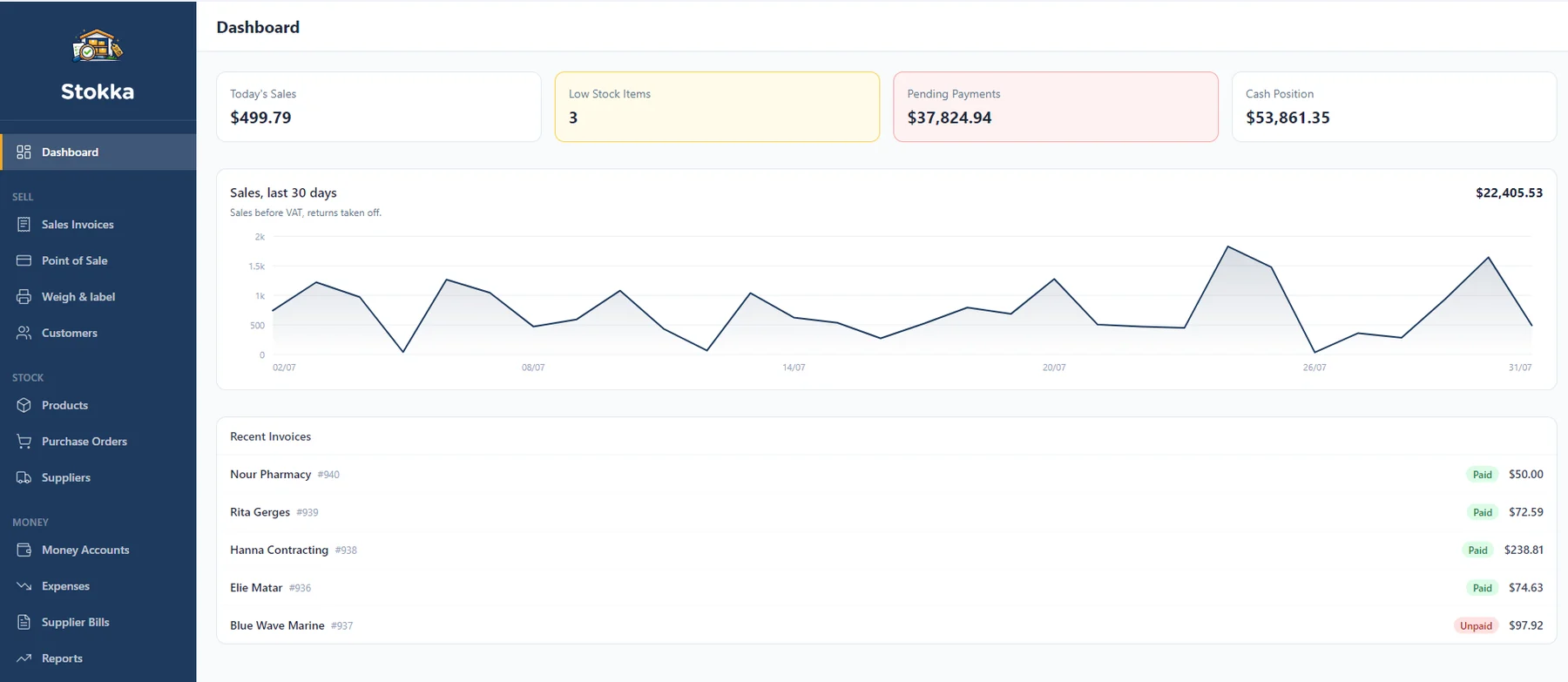
The Stokka dashboard: today's sales, low stock items, pending payments and cash position across the top, a 30-day sales chart below, and a list of recent invoices with paid and unpaid status.
100
Free products, no expiry
15
Built-in reports
1,537
Strings, all of them in Arabic
8
Modules on by default
Why Stokka exists

Four things, and nothing
on the market has all four

Plenty of software does inventory. The combination is the gap.

Arabic & RTL
Every screen mirrors, not just the text.
Truly offline
The desktop edition never needs the internet.
Zero training
Designed for an owner working alone.
Own it outright
One-time purchase on desktop. No monthly fee.

Stokka is deliberately not an ERP. It is inventory and sales management for a small shop, and it is honest about where that line sits — see what it does not do.

Editions

Two shells,
one interface

Every edition runs the same screens in English and Arabic. What differs is where the data lives and whether more than one person can sign in.

Desktop
One shop, one machine, no internet.
Runs on
Windows desktop
Data lives
On the shop’s PC
Internet
Never required
Users
One
Licensing
One-time purchase, bound to the machine
Available
Lebanon and anywhere
Cloud
Shops with staff, on any browser.
Runs on
Any browser
Data lives
Managed Postgres, one database per shop
Internet
Required
Users
Multiple, with roles and per-user permissions
Licensing
Account + subscription
Available
Gulf, diaspora, multi-user shops

Why some features are Cloud-only. The desktop edition has no user accounts — there is exactly one person at one machine. Staff, roles, manager overrides, named registers and the audit log all require someone to name. That is a deliberate boundary, not an unfinished port.

What’s included

Everything your shop
needs, nothing it doesn’t

Suppliers, customers, products, purchase orders, invoices, quotations, reports and bundles are on by default in every edition. Switch off what you don’t use — it hides, it doesn’t delete.

Desktop + Cloud
Quantity is never typed
There is no “edit quantity” box anywhere, by design. Stock moves only through a receipt, a sale, a return, an adjustment or a count — and every one of them is recorded against the product.
Desktop + Cloud
Batches & expiry
Per-product opt-in. Every receipt opens a batch, sales deduct first-expiring-first automatically, and each batch carries an expired / expiring-soon / OK badge.
Desktop + Cloud
Landed cost, including late costs
Transport and customs are distributed across an order’s lines and folded into real unit cost. Freight billed weeks after receipt can still be added — and a product that has since sold out is named in the response, never silently absorbed.
Desktop + Cloud
Suggested order
Everything at or below its threshold, grouped by the supplier who last delivered it, with the shortfall rounded up to a whole pack. One press per supplier creates the draft.
Desktop + Cloud
Sales, returns & store credit
Line and invoice discounts, automatic VAT, several payments per invoice, and returns capped at the original quantity. A refund defaults back to the account that funded the sale, card first.
Desktop + Cloud
Quotations & the bench list
Draft → sent → approved → converted, with no stock movement until conversion. Serial and IMEI ride the quotation, and the Open filter is a repair shop’s devices-on-the-bench-right-now list.
Desktop + Cloud
15 built-in reports
Profit & loss, VAT return, pending payments aged by due date, what earns most, what is not selling, stock value by month, expiring stock, accounts payable and more — plus five charts that print every figure beside the plot, so the picture is never the only way to read the number. All of them take a date range, and all of them print.
Desktop + Cloud
Money accounts & expenses
Cash, bank and wallet accounts with running balances and a balance-after figure on every movement. Transfers across currencies record the rate they were struck at.
Desktop + Cloud
Stock counts that respect the till
Confirming a count sheet applies the live difference, not the difference against the snapshot — so a sale rung while the sheet was out is never booked as shrinkage.
Desktop + Cloud
English & Arabic, fully mirrored
Switching to Arabic sets the whole application right-to-left, not just the text direction. 1,537 interface strings, and Arabic covers every one of them.
Desktop + Cloud
Multi-currency
A second currency alongside the primary one, throughout. Documents and payments record the rate they were struck at. Generic primary/secondary — not tied to any particular pair. Included on every paid edition.
Desktop + Cloud
Variations
Enter attributes — size by colour — and generate one ordinary product per combination. Included on every paid edition.
Desktop only
Backup & restore
Pick a folder, back up now or restore from a file. Runs automatically once a day on launch.
Cloud only
Staff, roles & permissions
Owner, manager and staff accounts, each granted only the areas they need — enforced on the server, not merely hidden in the sidebar. Settings and opening balances stay owner-only and cannot be granted away.
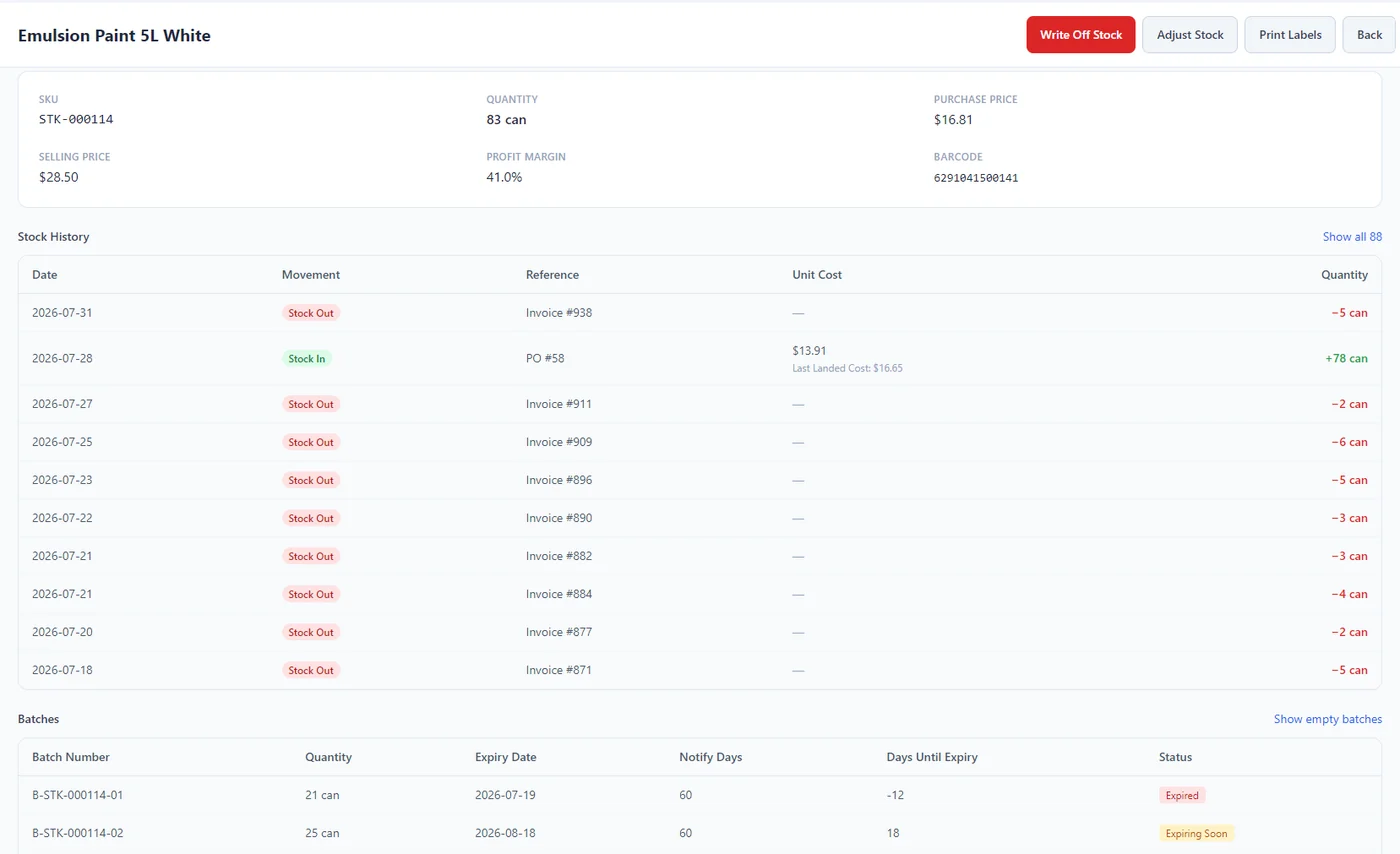
A product page for Emulsion Paint 5L White showing SKU, quantity, purchase and selling price, a stock history of receipts and sales against each invoice, and a batch table with expiry dates marked Expired and Expiring Soon.

Batches, expiry and every movement against one product.
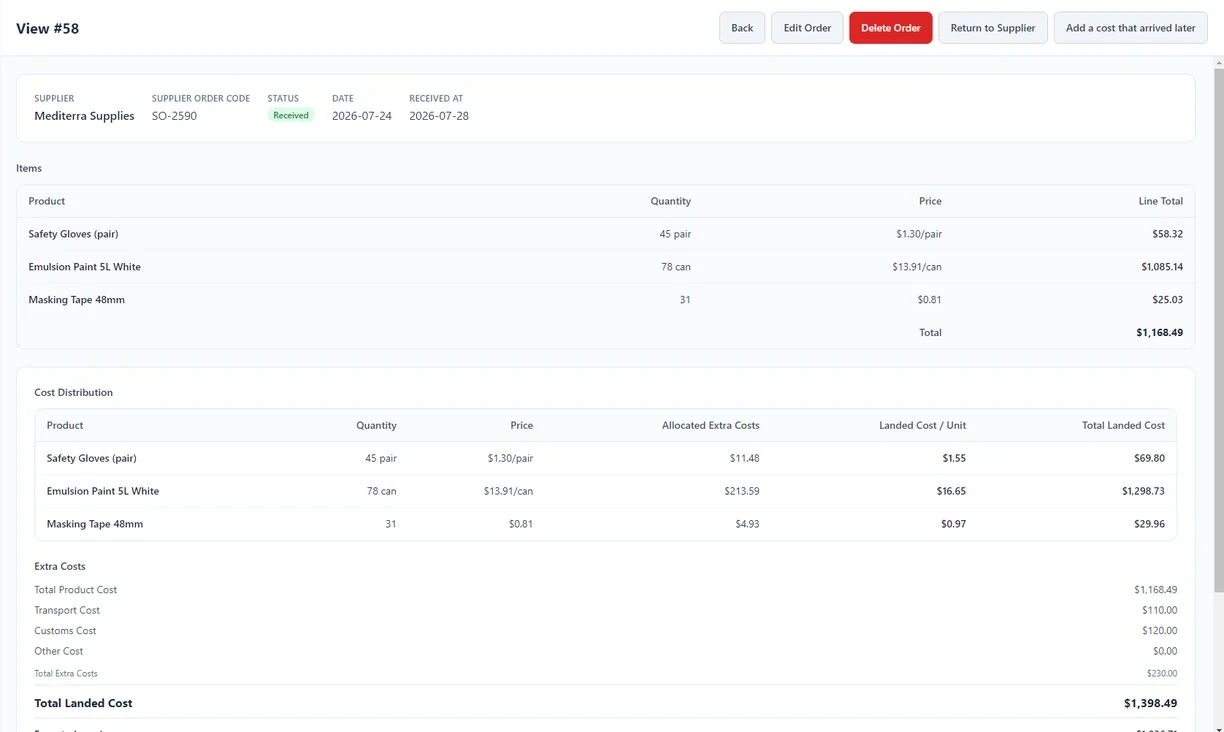
A received purchase order with its cost distribution table: transport and customs costs allocated across each product line, showing the landed cost per unit next to the original invoice price.

Transport and customs, folded into what the goods actually cost.
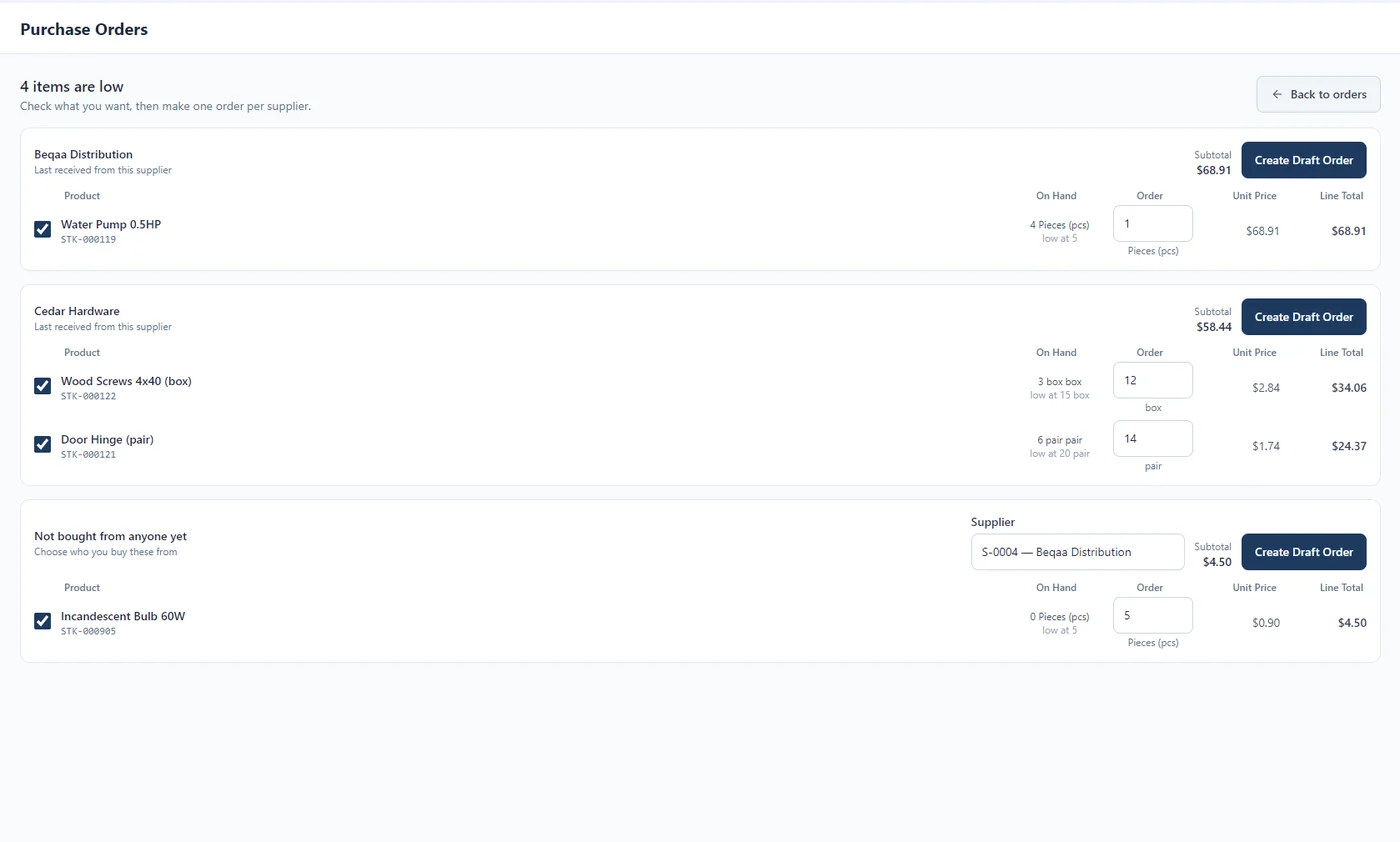
The suggested order screen listing four low-stock products grouped under the supplier who last delivered them, each with its on-hand quantity, low-stock threshold and a suggested order quantity, plus a Create Draft Order button per supplier. A final group collects products not yet bought from anyone, with a supplier still to be chosen.

What to reorder, from whom, and how much — already worked out.
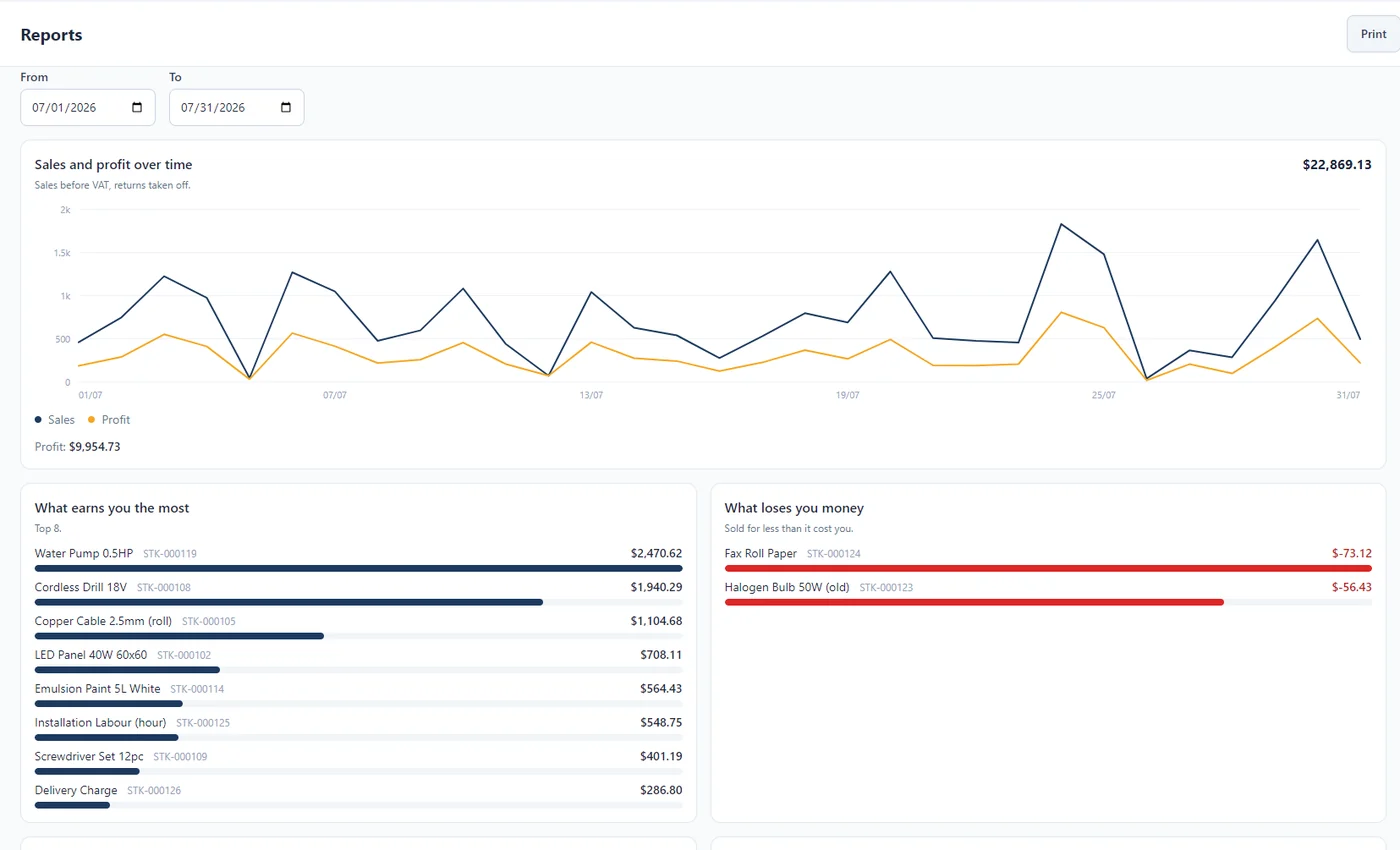
A printable report over a chosen date range: sales and profit plotted over time, with What earns you the most ranking products by gross profit alongside a What loses you money list.

Gross profit ranked by product, for any date range you pick.

The numbers

Why you can trust
what it tells you

Every line here is a rule enforced in the product, not a promise made in marketing.

Quantity cannot be fudged There is no editable quantity field. Stock changes only through a document, and every document is reversible or auditable.
Costs are real costs Freight and customs are distributed into unit cost, so margin is measured against landed cost — including costs that arrive after the goods do.
History does not move Money figures on a confirmed document are frozen at confirmation. A later price change cannot re-price yesterday.
Oldest stock sells first Expiry-tracked products deduct first-expiring-first automatically, and the deduction is recorded.
Cash reconciles The expected drawer figure accounts for the opening float, cash takings, refunds and hand-moved cash — and every row that moves it appears on the report that reconciles to it.
Refunds cannot exceed what was paid Capped invoice-wide across every earlier refund, enforced on the server.
Card data is not stored Only the last four digits and an approval reference. Never the full number, the expiry or the security code.
The rules live where the data is written Business rules are enforced in the database layer, not in the screen — so they hold no matter which shell or screen the write came from.
Point of sale · paid add-on

A register that keeps
the drawer honest

The strongest chapter in the product — and the one where the edition matters most.

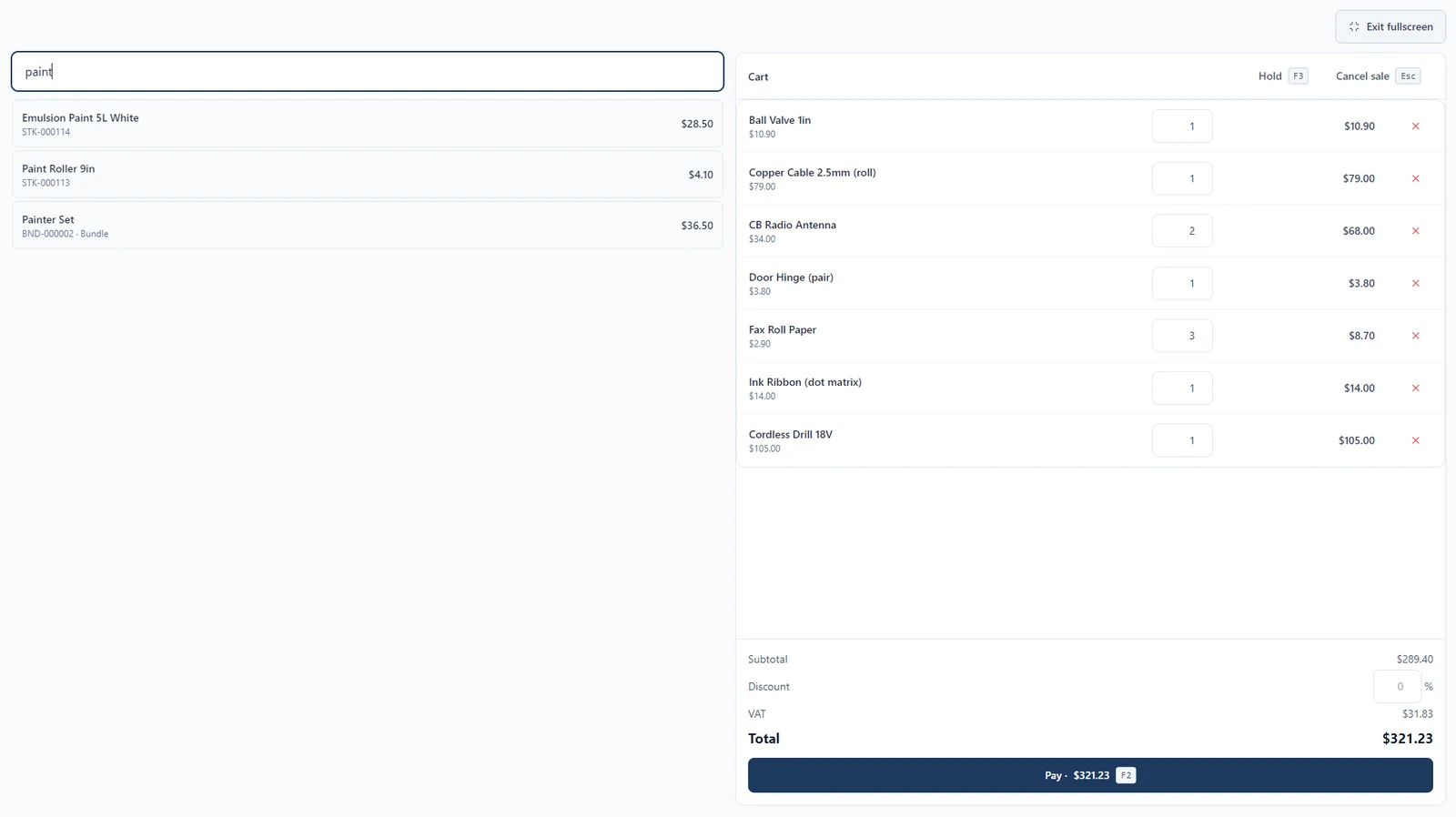
The point-of-sale register mid-sale: a product search on the left with matching results, a cart of seven lines with editable quantities on the right, and subtotal, discount, VAT and total above the pay button.
Desktop + Cloud

On every edition

Shifts Open with a counted float per drawer, ring sales, close against an expected figure — producing a variance and a Z-report.
Card settles first Card is capped at the balance due, so change only ever comes out of cash and card money never enters the expected-cash figure.
Money in and out of the till A supplier paid at the door, surplus walked to the safe — recorded mid-shift and counted into the expected figure, so honest payouts stop reading as shrinkage.
Hold this sale One parked basket per register. Prices and stock are re-checked live on resume, never restored stale.
Weighed goods Scale labels with an embedded weight or price are parsed before the ordinary barcode lookup, every segment length configurable because scales differ. PLU codes auto-allocate from per-category ranges.
Receipts A 58 mm or 80 mm thermal-roll layout marking taxed lines, printed through the system print dialog.
Cloud only

Once you have staff

Named terminals Each register is a named station owning its own drawers, with one open shift each. The picker names who is on a busy register, and since when.
Manager overrides A cashier cannot remove a line, cut a quantity, void a sale or refund cash without a permission-holder approving — a short typed code, or a long one scanned off a staff card.
Sell below recorded stock The customer is holding goods the count says are absent. Blocking throws away the sale and the shrinkage signal; an approval keeps both. Approved per sale, and never offered on an expiry-tracked product.
The override record is the audit trail Approvals are recorded before the change is applied, so a real change can never sit beside a record saying it never happened. Failed attempts are recorded too.
Blind close The cashier counts the drawer without ever being shown the expected figure — it is not sent to their screen, so it cannot be copied into the count box. Owners still see both.
Cost is not the cashier’s business A user without the purchasing or reporting permissions reads products and sale results with cost prices blanked.
Price-check kiosk A customer-facing wall unit: scan, see the name and VAT-inclusive price, screen clears itself. The device account’s entire server reach is a product read.
Paid modules

Pay for the ones
your shop actually uses

Each module is sold on its own and hidden entirely until you buy it. A shop that never weighs anything never sees a scale setting.

Desktop + Cloud
POS
The cash register, shifts and Z-reports, quick keys, and the weigh-and-label station. On Cloud it adds named terminals, manager overrides and the price-check kiosk.
Desktop$150 one-time
Cloud+$15 / month
Desktop + Cloud
Manufacturing
Recipes and production orders for a bakery or a workshop. Components are consumed first-expiring-first, and completion asks what really came out — so yield loss lands in the unit cost instead of hiding.
Desktop$150 one-time
Cloud+$15 / month
Desktop + Cloud
Pharmacy
The Ministry-of-Health medicine catalog keyed on registration number, alternatives by active ingredient or therapeutic class with what you actually have in stock, and bulk catalog pricing.
Desktop$150 one-time
Cloud+$15 / month
Catalog updates $50/yr, optional — the module keeps working either way.

That is the price of the first module. Every one after it is $50 on desktop and $5 a month on Cloud — see pricing.

Bilingual

Arabic isn’t a
translation layer

It was built in from the start. The codebase forbids hard-coded interface text — every string goes through the translation layer, enforced on every commit.

1,537 strings, and Arabic covers every one Measured July 2026, zero missing keys.
Arabic carries more strings than English Arabic has more plural forms, and the product handles them rather than approximating.
The whole application mirrors Switching language sets the layout right-to-left, not just the text direction.
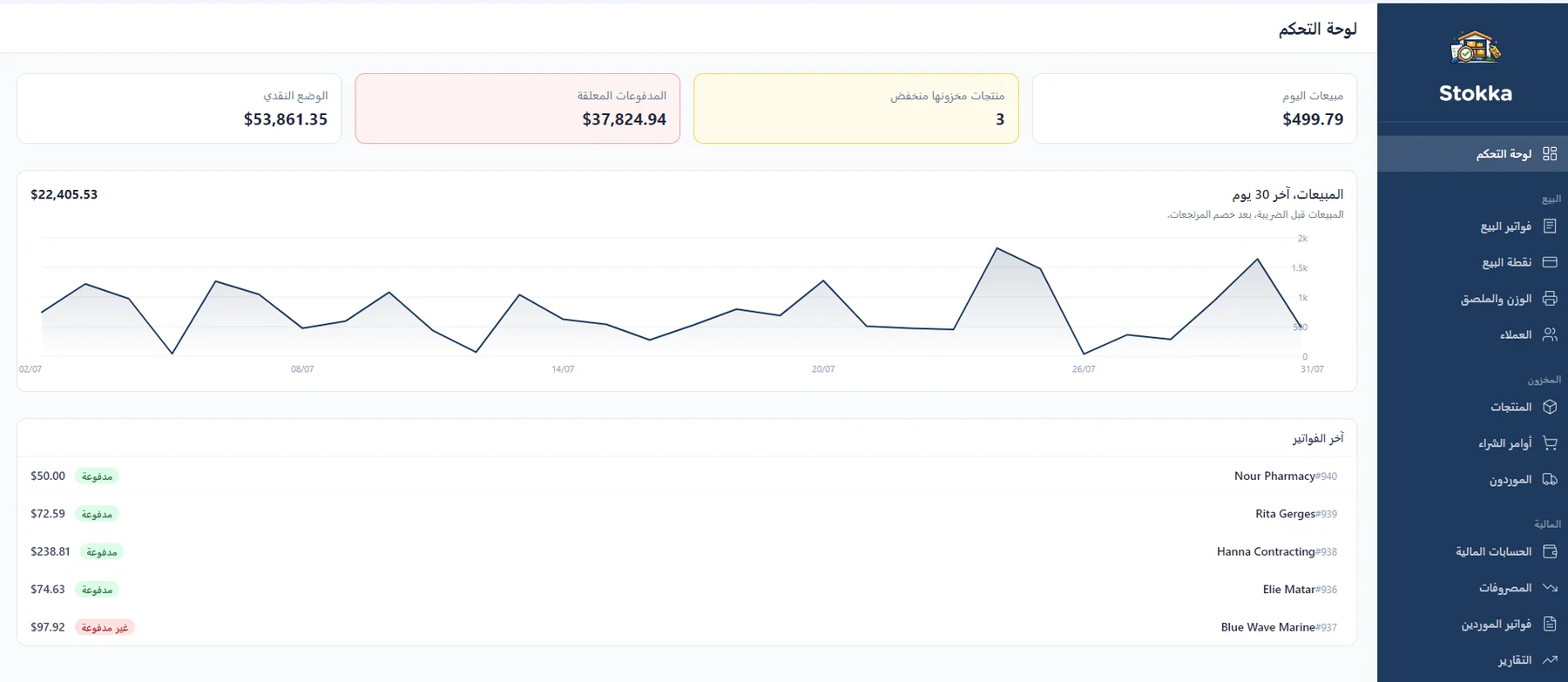
The same Stokka dashboard in Arabic: the interface is fully mirrored right-to-left, with the sidebar on the right and every label, heading and chart axis translated.

The same screen, one toggle later.

Who it fits

The eight shops it
was designed against

Corner shop
Products, register, invoices, credit, expenses.
Mini-market Best served
Pack sizes, weighed goods and scale labels, quick keys, suggested orders, slow movers. The best-served shop on this list.
Small city supermarket Cloud
Named terminals, manager overrides, blind close, shift reports, staff permissions — which means the Cloud edition.
Parts shop
Trade discounts, credit limits, serial numbers, supplier part numbers.
Phone / small repair shop
The repair is a service line; the device, fault, parts and IMEI ride the quotation, and the Open filter is the bench list.
Bakery / small manufacturer Needs an add-on
Recipes, production orders, actual yield. Needs the Manufacturing add-on.
Butcher / greengrocer Needs an add-on
Weighed goods, scale labels, PLU ranges. Needs the POS add-on.
Corner pharmacy One caveat
Catalog, alternatives, expiry and first-expiring-first all ship. But receipt printing opens a print dialog per receipt, and there is no insurance co-pay concept — talk to us before you commit.
Being straight with you

What Stokka
does not do

Every line below was considered and deliberately rejected. Finding this out now is cheaper for both of us than finding it out after you’ve paid.

Multiple locations or warehouses. One shop, one stock figure.
Accounting proper — no chart of accounts, no journals, no double entry. Not a replacement for an accountant.
Sales orders, delivery notes and price lists — so wholesale and distribution are out of scope.
Restaurant operations. No tables, no floor plan, no kitchen orders.
Appointments or scheduling.
Payroll, HR, projects, CRM, contracts, ticketing — the forty-odd modules a full ERP carries.
Dashboards you build yourself. The charts that ship are a fixed set — no report builder, no custom metric, no drag-and-drop tile.
Loyalty points, coupons, gift cards.
Camera barcode scanning. A USB or Bluetooth scanner works; a phone camera is not a scanner here.
A mobile app.
Not on the desktop edition

Staff, roles and per-user permissions · manager overrides and the register-changes report · named terminals · the price-check kiosk · the audit log. All of it needs someone to name, and the desktop edition has exactly one person at one machine.

Pricing

Start free.
Buy it once.

The free tier doesn’t expire. No trial period, no credit card, no nag screen.

Start here — then add only the modules your shop needs
Free
Desktop only
$0 no expiry

The complete application, capped at 100 products, without the paid modules. There is no trial that expires.

  • Up to 100 products
  • All core modules
  • Sales, purchasing, quotations, bundles
  • All 15 built-in reports
  • Batches, expiry and landed cost
  • 100% offline · English & Arabic
Download free
Cloud
Any browser
$19 / month, 5 users included

For shops with staff. Roles and per-user permissions, enforced on the server, with one database per shop.

  • Unlimited products
  • Multi-currency and variations included
  • Staff, roles and per-user permissions
  • Extra users +$6/user/mo ($5 on annual)
  • Annual prepay — 2 months free
  • Managed backups, always current
Talk to us →
Modules — add any of them to a paid edition
POS
Desktop $150 one-time
Cloud +$15 / month
Manufacturing
Desktop $150 one-time
Cloud +$15 / month
Pharmacy
Desktop $150 one-time
Cloud +$15 / month
Catalog updates $50/yr, optional — the module keeps working either way.
Take more than one

The first module is $150. Every module after it is $50 — so any two come to $200 and all three to $250, on top of the $250 desktop licence. On Cloud the same ladder runs $15 · $20 · $25 a month.

A desktop module is bought once and keeps working — there is no renewal that switches your register off. Prices in USD.

Get started

READY TO RUN
YOUR SHOP ON
REAL NUMBERS?

Download free and run it on up to 100 products — no card, no expiry, no nag screen. When you're ready to lift the cap or add a register, talk to us.

Talk to us about Stokka →