A contractor finishes a job at six in the evening. The customer asks for the invoice, so he opens WhatsApp and types it out: the work, the total, "thanks, habibi." Three weeks later neither of them remembers whether it was paid, and the only record is buried somewhere between a voice note and a sticker.
So he tries an invoicing app. It wants an account, a card for the trial, and then a monthly fee. Twenty minutes in, it asks him about accounts receivable. He deletes it and goes back to WhatsApp. I don't blame him. The tool he needed exists in pieces everywhere, and in one piece almost nowhere — so we're building it. It's called 3S Invoice.
The monthly bill
Most invoicing apps are subscriptions. For a company with an accounts department that's a rounding error. For a freelancer who opens the app a few times a week, it's a bill that arrives every month whether the work did or not.
Do the honest cost calculation. A modest subscription is a couple of hundred dollars a year — every year, for as long as you invoice anyone. And in Lebanon, since 2019, every recurring dollar gets questioned, and paying a foreign subscription with a local card has been its own small adventure.
The free version costs nothing. Pro comes two ways: a $99 lifetime licence you pay once, or $30 a year — $2.50 a month, billed annually. Nothing is billed monthly.
The honest aside: I'm not against subscriptions. Stokka Cloud is $19 a month, because a server running for your shop costs money every month. 3S Invoice has no server. There's no account to create, and your business data sits on your own phone. There's nothing running on my side that would justify charging you every month.
Free means free
In August I explained why Stokka has no free trial but a free version. 3S Invoice follows the same thinking, and goes one step further: Stokka's free version stops at 100 products, and this one has no cap at all.
The free version includes:
- Unlimited customers and invoices. No monthly invoice limit, no countdown, no expiry.
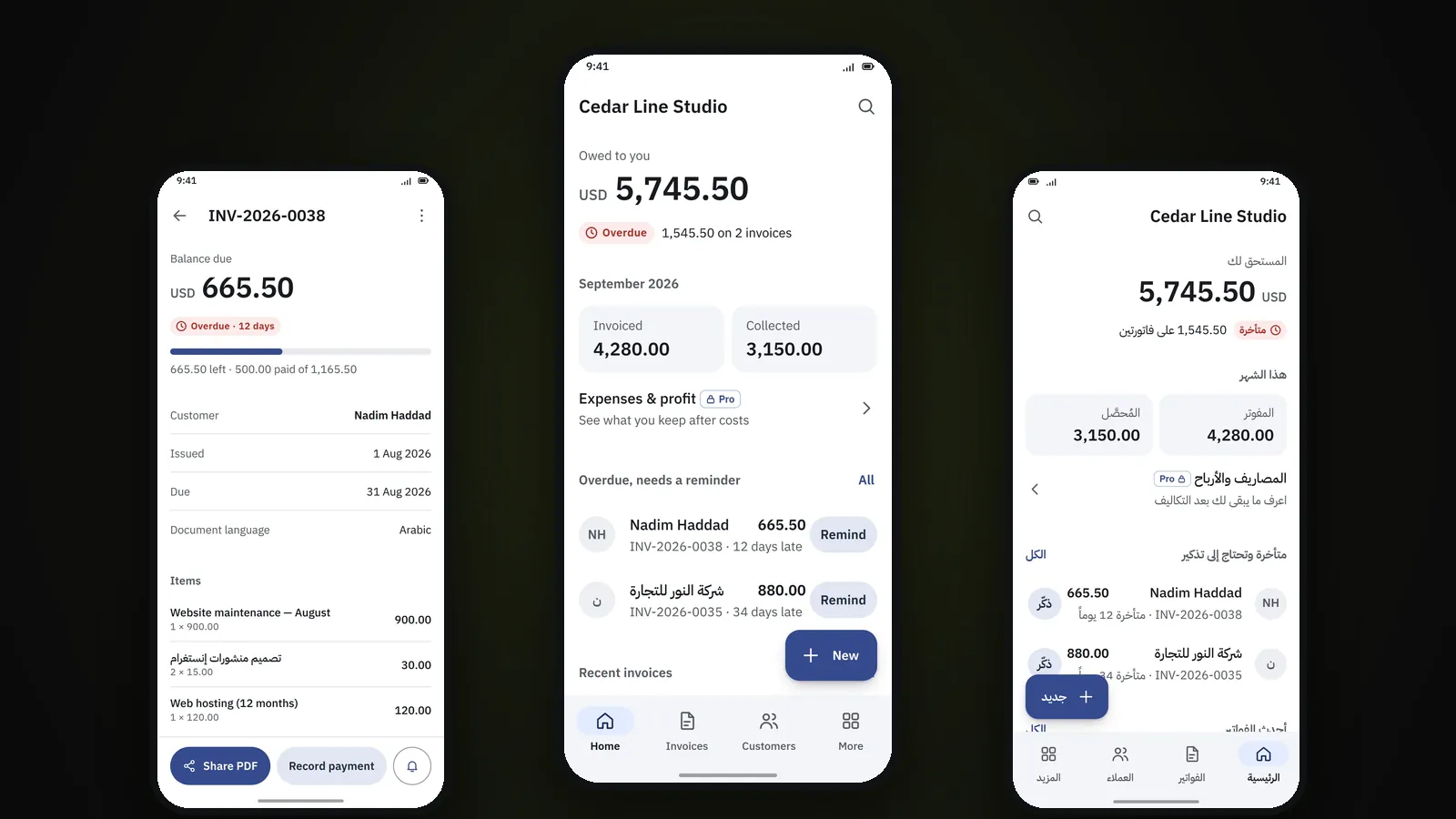
- Full and partial payments. Record the whole amount, part of it, or several payments against one invoice. The balance updates itself.
- Due dates and overdue tracking. Overdue invoices stand out, along with how many days late each one is.
- Reminders through the apps your customers actually read. WhatsApp, SMS, email, or anything else on your phone.
- Professional PDF invoices and A4 printing. Your logo, your details, the line items and the tax, shared or printed.
- Local backup and restore.
That's the whole invoicing workflow. For plenty of freelancers, it's all they'll ever need, and some of them will stay on it for good. That's fine by me — someone who uses it for free for a year is the best reference I'll ever get.
If the free version can't do the job, it isn't a free version. It's an advert.
No ledger
3S Invoice is deliberately not accounting software. It won't ask you about debits, credits or a chart of accounts. It answers the questions a business owner actually asks:
- Who owes me money?
- Which invoices are overdue?
- How much did I invoice, and how much did I collect?
- What did I spend, and did this project make money? (Pro)
The rule behind every screen is simple: the app uses business words — Invoiced, Paid, Owed — and never accounting words. If a label needs explaining, we change the label.
What Pro adds
Free gets you paid. Pro tells you whether the business is actually making money. It adds:
- Quotations that turn into invoices once accepted, without retyping a line.
- Expenses with categories, linked to a project if you want.
- Projects with their own profit and margin.
- Reports: profit and loss, sales, expenses, projects, and receivables aging.
- Thermal receipt printing on common 58 mm and 80 mm printers.
The part I care about most is that profit and cash are shown separately. Say a website project was invoiced at 8,000 and cost 2,500 in expenses. That's 5,500 profit. But if the customer has only paid 6,000 so far, 2,000 of it is still sitting in their pocket. Plenty of owners find this out the hard way, when the "profitable" month can't pay the rent. 3S Invoice shows you both numbers side by side.
Built for how business works here
Small businesses in this region run on their phones. The invoice gets written at the counter or on a job site — and the connection is whatever the generator and the network allow that day. So a few decisions weren't up for debate:
- Offline-first. Invoices, payments, expenses, reports and PDFs all work without an Internet connection.
- Arabic that's actually Arabic. Every screen mirrors right to left, down to the layout. English and French are there too.
- Your language, your customer's language. Run the app in English and issue the invoice in Arabic. The two are set separately.
- Your currency. Pick a primary currency, and each document keeps its own.
The flip side of keeping your data on your phone is that backups are yours. The app makes a local backup whenever you ask it to — keep a copy somewhere other than the phone. A phone that falls into a bucket of plaster takes the invoices with it.
Where it stands
When this post was first published, 3S Invoice was still in development and the screens came from its design board. You can now download it and see the real thing.
If you invoice from your phone today — on WhatsApp, in a notes app, or on the back of a receipt book — it was built for you.